

Add suggested risks to the repository
The risk repository holds risks that VirgilTrack suggests to an organisation, so its people can copy them into their registers. Most suggestions come from the organisation’s strategic plan. Platform administrators also have a form for adding a suggestion by hand. This page explains the form, and what happens when you submit it.
Before you start
Section titled “Before you start”- You need the Administrator role. Only administrators see the button that opens the form.
- Virgil, VirgilTrack’s AI, writes the suggestion’s name from your description. If Virgil isn’t available, the suggestion can’t be saved.
Open the form
Section titled “Open the form”-
Select Risk Repository in the menu on the left.
The menu leaves out Risk Repository for accounts that also have the CEO role. If yours does, type VirgilTrack’s address followed by /risk-repository in your browser’s address bar instead.
-
In the bar under the header, after Actions:, select the plus button, Add RiskRegister Risk.
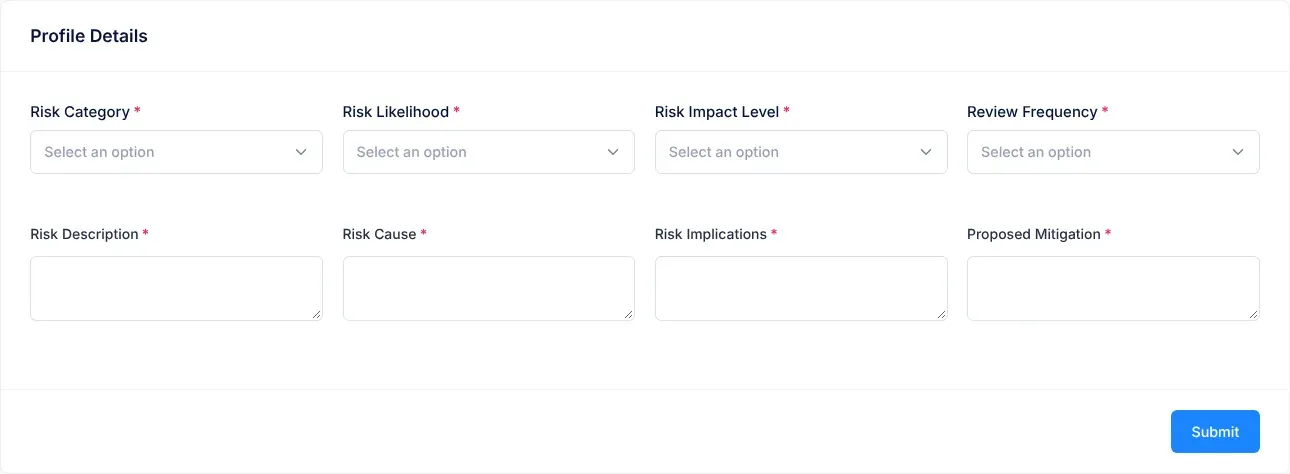
The form opens. Its heading says Profile Details, even though it is the form for a new suggestion.
Fill in the form
Section titled “Fill in the form”Every field is required.
| Field | What to enter |
|---|---|
| Risk Category | The kind of risk, such as Financial Risk or Operational Risk. |
| Risk Likelihood | How likely the risk is to happen, from Very Low to Very High. See How risk scores work. |
| Risk Impact Level | How bad it would be, from Very Low to Very High. |
| Review Frequency | How often the risk should be reviewed, such as Monthly or Quarterly. |
| Risk Description | What could go wrong. Write at least 50 characters, and no more than 5,000. |
| Risk Cause | Why it could happen. |
| Risk Implications | What would happen if it did. |
| Proposed Mitigation | Ways to reduce the risk. |
Point at the information icon next to a list’s name for a hint, for example “What Is the Likelihood of the Risk occurring?”.
Submit the suggestion
Section titled “Submit the suggestion”-
Fill in every field.
-
Select Submit.
The button shows “Please wait…” while Virgil writes the suggestion’s name.
-
When Success and “New Risk Added to Risk Repository” appear, select OK.
What happens next
Section titled “What happens next”- VirgilTrack saves the suggestion with your answers. Virgil gives it a short name, of no more than six words, written from your Risk Description.
- The Risk Repository opens again.
- The new suggestion isn’t in the list, and nobody else sees it either, because it doesn’t belong to an organisation. See the caution at the top of this page.
- Nobody is notified.
To give an organisation a risk it should consider, ask its people to add it to their register with Add risk instead. See Add a risk.
If something goes wrong
Section titled “If something goes wrong”| What you see | Why | What to do |
|---|---|---|
| “Sorry, looks like there are some errors detected, please try again.” | A field is empty, or the description is too short. The field shows a message such as “Risk Category is required”. | Select Ok, got it!, then fill in the fields marked in red. |
| “The Description must be more than 100 and less than 5000 characters long” | The description is shorter than 50 characters. Despite the message, 50 characters are enough. | Write a longer description. |
| Invalid Input or Error!, with a message | The suggestion couldn’t be saved, for example because Virgil couldn’t write its name. | Try again later. |