

Calendar and reminders
The calendar brings your dates together in one place: meetings and other events, the due dates of strategy tasks, risk control reviews and scheduled risk reviews. Before each date, VirgilTrack reminds the people involved.
Open the calendar
Section titled “Open the calendar”Select Execution, then Calendar. Everyone in an organisation has Calendar in their Execution menu. See Find your way around Execution.
The calendar opens on a list of this week.
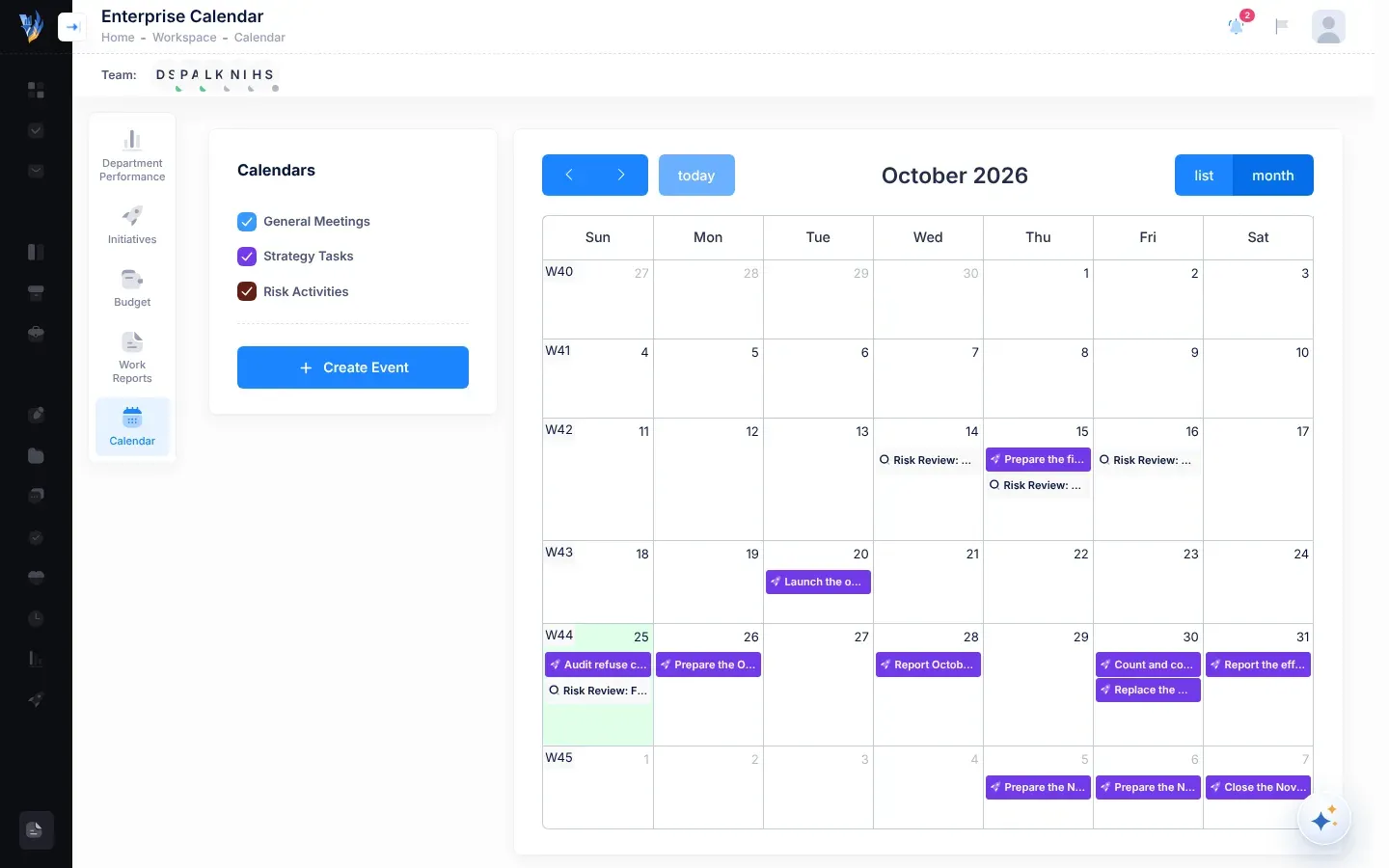
What’s on the calendar
Section titled “What’s on the calendar”Each kind of item has its own colour and a small icon before its title.
| Item | Looks like | Shown | Who sees it |
|---|---|---|---|
| Events and calendar tasks: meetings, deadlines, trainings and other events | Blue, with a calendar icon | From their start time to their end time | Employees: the ones they created, or that are assigned to them or their department. Managers: also every event created in their department. The CEO: every event in the organisation. |
| Strategy tasks that aren’t done | Purple, with a rocket icon | All day, on their due date | Employees: their own tasks. Managers and the CEO: every open strategy task in the organisation. |
| Risk controls that aren’t implemented | Dark red, with a shield icon | On the control’s next review date, from 08:00 to 17:00 | Employees: controls they created or are responsible for. Managers: also the controls of their department’s risks. The CEO: every control in the organisation. |
| Scheduled risk reviews, including ones already done | Dark red, with a magnifying glass icon, named Risk Review: and the risk’s code | At the review time, for 30 minutes | Employees: reviews for them, and for risks they are responsible for. Managers: also their department’s. The CEO: the whole organisation’s. |
Calendar tasks are events that someone must do something about, such as a deadline. VirgilTrack treats every event assigned to a person as a calendar task, until someone marks it as done. See Events and calendar tasks.
Move around the calendar
Section titled “Move around the calendar”The buttons above the calendar change what you see:
| Button | What it does |
|---|---|
| The arrow buttons | Go to the previous or next week (in the list) or month (in the month view). |
| today | Go back to the current week or month. |
| list | Show the week as a list, day by day, with each item’s time. This is how the calendar opens. |
| month | Show the whole month as a grid. |
The title above the calendar shows which week or month you are looking at. The month view also shows week numbers.
Select a date’s number, or a week number, to see just that day or that week. Select list or month to go back.
In the month view, a day shows up to four items. If there are more, select +2 more (or however many there are) to see them all. In the list, “No events to display” means there is nothing for you that week.
Show or hide kinds of items
Section titled “Show or hide kinds of items”Who can use this:ManagerCEO
Managers and the CEO have a Calendars card beside the calendar. Untick a box to hide those items, and tick it to show them again:
- General Meetings: events and calendar tasks.
- Strategy Tasks: strategy tasks.
- Risk Activities: risk controls and scheduled risk reviews.
All three are ticked when you open the calendar.
Open an item
Section titled “Open an item”Select an item to open its panel on the right of the screen. Select Close, Cancel or outside the panel to close it. If you saved a change, the calendar updates when the panel closes.
| You select | The panel | See |
|---|---|---|
| An event or calendar task | Event / Task | Events and calendar tasks |
| A strategy task | Strategy Task | Update a strategy task from the calendar |
| A risk control | Risk Control Details | Mark a control as implemented |
| A scheduled risk review | Risk Review Details | Record a scheduled review in the calendar |
Add events and move items
Section titled “Add events and move items”- To add a meeting, deadline or other event, see Add an event.
- Managers and the CEO can drag items to another day. See Move an item to another day.
Reminders
Section titled “Reminders”VirgilTrack reminds people before their dates: 7, 3 and 1 days before an event, a risk review or a control review, and again on the day. It also sends a morning email about work due the next day, and one about overdue work. See Reminders.
Pages in this chapter
Section titled “Pages in this chapter”- Add an event: put a meeting, deadline or other event in the calendar, and invite people or departments.
- Events and calendar tasks: open an event, mark it as done, discuss it, or archive it.
- Update a strategy task from the calendar: change a task’s status, ask for more time, or discuss it.
- Move an item to another day: drag events, tasks and controls in the month view.
- Reminders: every reminder VirgilTrack sends, when, and how to choose how they reach you.