

Your team
The Your team tab helps you notice when someone who reports to you might welcome a conversation, and prepare it well. It shows facts about their work and only what they chose to share with you. As the page says: “VirgilTrack doesn’t guess how anyone feels.”
Before you start
Section titled “Before you start”You need people who report to you directly. If nobody does yet, the tab says “Nobody reports to you directly yet.” Who reports to whom is set by the CEO or an administrator, in the Roles & hierarchy section of Settings. See Settings.
The Your team tab at a glance
Section titled “The Your team tab at a glance”Open Emotional Intelligence, then Your team.
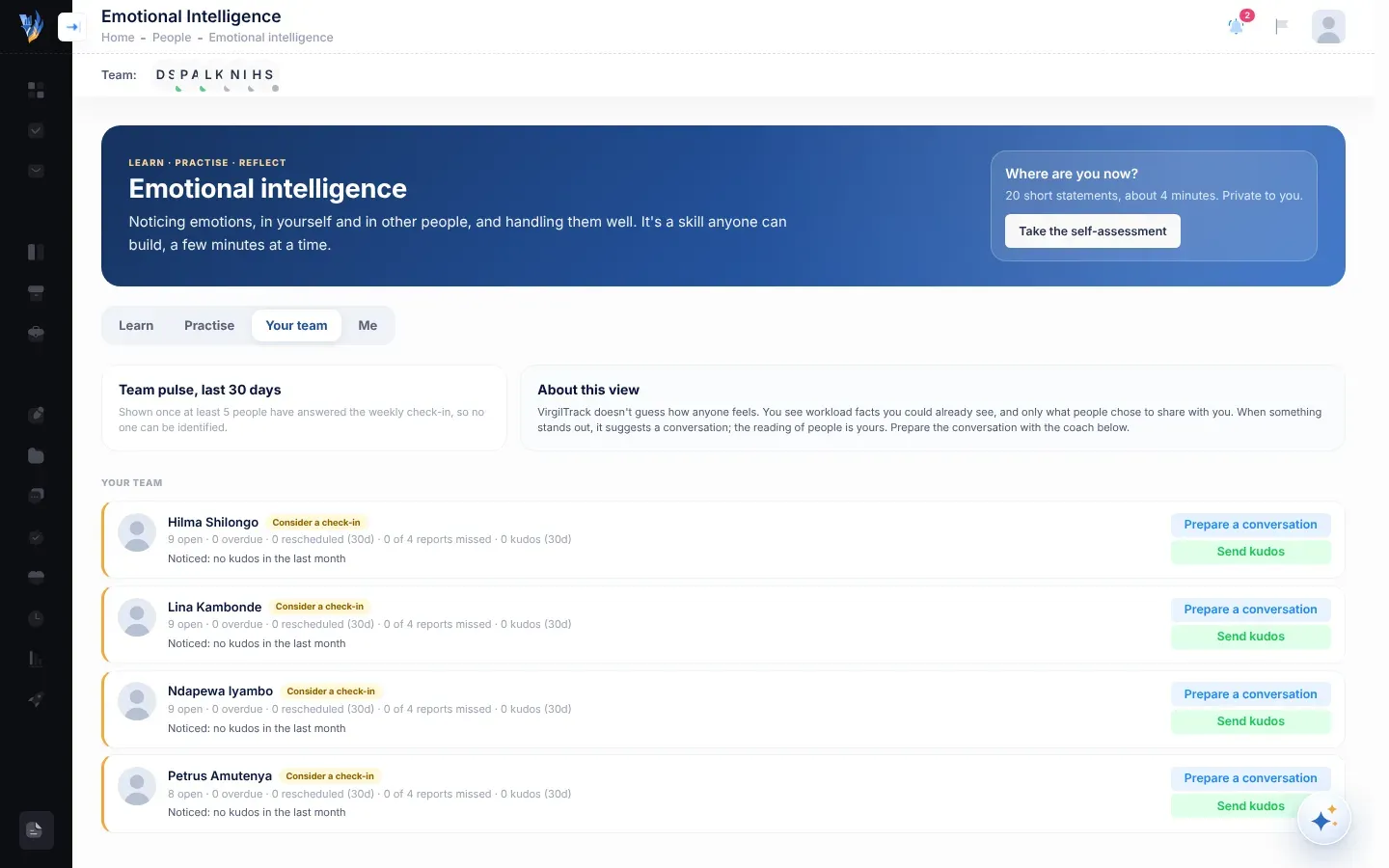
Team pulse, last 30 days
Section titled “Team pulse, last 30 days”This card shows how your direct reports answered the weekly check-in over the last 30 days:
- the average, out of 5, where 1 is “A hard week” and 5 is “A great week”;
- small bars for how many answers of each kind there were (point to a bar to see its answer and count);
- how many answers there were.
It never shows names, and every answer counts, whether or not the person shared it with you. Until at least 5 people have answered, the card says it will be “Shown once at least 5 people have answered the weekly check-in, so no one can be identified.”
Each person
Section titled “Each person”Each direct report has a card with their name and a line of facts:
| Fact | What it counts |
|---|---|
| open | Their strategy tasks that aren’t completed. |
| overdue | Open strategy tasks past their due date. |
| rescheduled (30d) | Their strategy tasks that have been rescheduled and changed in the last 30 days. |
| of 4 reports missed | How many of the last four weeks’ weekly reports they haven’t submitted. |
| kudos (30d) | Kudos they’ve received in the last 30 days. |
If they shared their weekly check-in with you this week or last week, their answer appears next to their name, for example “🙂 A good week”, and any note they wrote appears below.
Consider a check-in
Section titled “Consider a check-in”When something stands out, the card shows Consider a check-in and a line starting “Noticed:” with the reasons. People with the most reasons are listed first.
| Reason shown | When it appears |
|---|---|
| “… tasks overdue” | 3 or more strategy tasks are overdue. |
| “… tasks rescheduled this month” | 3 or more strategy tasks were rescheduled in the last 30 days. |
| “… of the last 4 weekly reports not submitted” | 2 or more of the last four weekly reports weren’t submitted. |
| “… open tasks” | 12 or more strategy tasks are open. |
| “shared that this week was hard” | They shared A tough week or A hard week with you. |
| “no kudos in the last month” | They have open tasks but no kudos in the last 30 days. |
These are prompts to talk, not judgements. The reading of people is yours.
Prepare a conversation
Section titled “Prepare a conversation”-
Select Prepare a conversation next to the person.
-
In What have you noticed, in your own words?, describe what you’ve seen. For example: “Quieter than usual in meetings, and two tasks slipped this month.”
-
Select Prepare the conversation.
After a moment (“Thinking…”), a plan appears.
| Part of the plan | What it gives you |
|---|---|
| Open with | A first sentence or two to start the conversation. |
| Ask | Three or four open questions. |
| Listen for | What to listen for, and how to respond. |
| Avoid | What not to say or do, and why. |
| Close with | How to end with a clear, supportive next step. |
The plan is written from what you typed and the person’s workload facts. It never tells you what the person feels: it helps you find out by asking.
Select Prepare a conversation again to close the plan.
Send kudos
Section titled “Send kudos”Select Send kudos next to the person, write what they did and the difference it made, and select Send kudos. See Kudos.
Use Virgil Copilot
Section titled “Use Virgil Copilot”You can also ask Virgil Copilot:
- “Who in my team could use a check-in?” Virgil lists who might welcome a check-in and why, from the same facts.
- “Help me prepare a check-in with Tendai.” Virgil prepares the same kind of plan. Anyone can ask for this, but workload facts are only used for your own direct reports.
See What Virgil can do.
If something goes wrong
Section titled “If something goes wrong”| What you see | Why | What to do |
|---|---|---|
| There is no Your team tab. | It is only for managers and the CEO. | Ask your administrator if your role should be Manager. |
| “Nobody reports to you directly yet.” | No one has you as the person they report to. | Ask your CEO or an administrator to set who reports to you in Roles & hierarchy. |
| The team pulse isn’t shown. | Fewer than 5 of your direct reports answered in the last 30 days. | Nothing to fix. It appears when enough people answer. |
| “The coach couldn’t help just now. Try again.” | The plan couldn’t be written at that moment. | Select Prepare the conversation again. |
| Prepare the conversation can’t be selected. | The box is empty. | Describe what you’ve noticed. |