

Risk reviews and reminders
A risk review is a regular check of a risk: has its likelihood or impact changed, and are its controls working? VirgilTrack keeps each risk’s next review date, reminds the responsible people before it, and then sets the date of the following review.
To carry out a review, see Review a risk.
A risk’s review schedule
Section titled “A risk’s review schedule”Each risk’s schedule is set on its form when the risk is added, assessed or edited. See Add a risk, Assess a risk and Edit a risk.
| Field | What it does |
|---|---|
| Mitigate by | The date by which the risk should be mitigated. Reviews are never scheduled after this date. |
| Review every | How often the risk is reviewed. See Review frequencies. You must choose one when you add or edit a risk. When you assess a copied risk, you can leave it empty. |
| Next review and at | The date and time of the next review. When you assess a copied risk, this field is called First review. When you add or assess a risk, the time starts at 10:30. |
| Responsible people | The people who follow the risk until it is mitigated. They get the review reminders. |
When you set or change the next review, it must be in the future and on or before the Mitigate by date.
Where you see it
Section titled “Where you see it”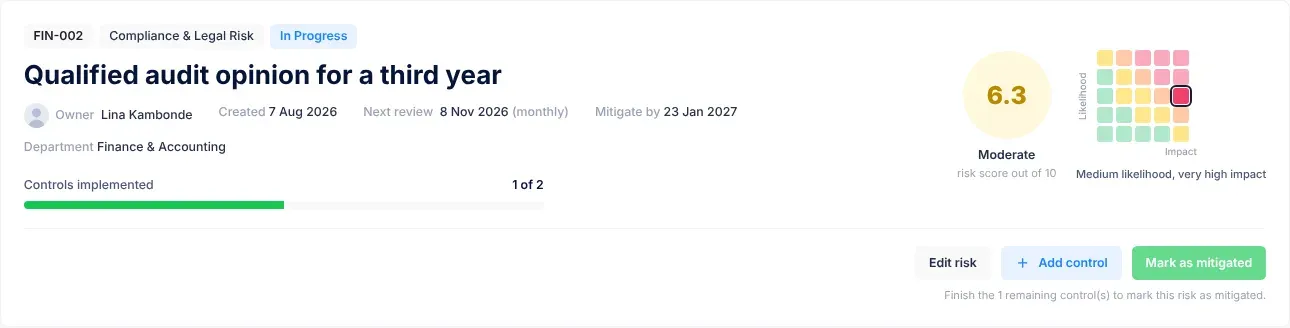
- On the risk’s page, at the top: “Next review”, the date, and the frequency in brackets, for example “Next review 3 Nov 2026 (monthly)”. The date is red when it has passed and the risk isn’t mitigated.
- In the risk register, the Next review column. A passed date is red, with overdue under it. See The risk register.
Review frequencies
Section titled “Review frequencies”Review every offers these choices. After each review date, VirgilTrack moves the next review on by the number of days shown.
| Review every | What it means | Next review moves on by |
|---|---|---|
| Ad-Hoc | The risk is reviewed and resolved case by case as it arises, rather than on a set schedule. | It doesn’t move. Set each review date yourself. |
| Weekly | The risk is reviewed every week. | 7 days |
| Biweekly | The risk is reviewed every two weeks. | 14 days |
| Monthly | The risk is reviewed once a month. | 30 days |
| Quarterly | The risk is reviewed every quarter (three months). | 90 days |
| Annually | The risk is reviewed once a year. | 186 days |
| Semi-Annually | The risk is reviewed two times in a year. | 365 days |
Which frequencies you can choose
Section titled “Which frequencies you can choose”- Review every only offers frequencies that fit before the Mitigate by date. Ad-Hoc is always offered. In the Add a risk window and on Edit risk, the frequency you have already chosen stays in the list too.
- When you assess a copied risk and change Mitigate by so that the chosen frequency no longer fits, Review every is cleared and you choose again.
- When Next review is still empty and you choose a frequency other than Ad-Hoc, VirgilTrack suggests a date: today plus the frequency, or the Mitigate by date if that comes first.
- When you assess a copied risk and haven’t set Mitigate by yet, you see “Set the deadline first to see sensible options.”
Reminders before a risk review
Section titled “Reminders before a risk review”Each night, VirgilTrack looks for risks that aren’t mitigated and whose next review is coming up. It sends each of the risk’s responsible people a reminder:
| When | Reminder sent |
|---|---|
| 7 days before the review | At 09:00 |
| 3 days before the review | At 09:00 |
| 1 day before the review | At 09:00 |
| On the day of the review | One hour before the review time |
Each reminder comes in two forms:
- An email with the subject “Risk review due”, the date and the risk’s code, for example “Risk review due Tue 3 Nov: FIN-002”. It says “this risk is due for review on …. Check whether its likelihood or impact has changed and whether the controls are working.” It lists the risk, the review date and the department. Its Review the risk button opens the risk’s page.
- A notification in VirgilTrack called Risk review due, with the risk’s code and name.
If a risk has no responsible people, VirgilTrack makes its owner responsible and sends the reminders to them.
Reminders stop once the risk is marked as mitigated.
After the review date
Section titled “After the review date”At the start of the review day, VirgilTrack sets the next review date. It adds the risk’s frequency to the current review date, but never goes past the Mitigate by date. So on the review day itself, the risk’s page already shows the date of the following review.
For example, a Monthly risk due for review on 3 November gets a next review date of 3 December.
When a review becomes overdue
Section titled “When a review becomes overdue”A review date stays in the past, and shows as overdue, when VirgilTrack can’t move it on:
- the risk’s Review every is Ad-Hoc,
- the next review has reached the Mitigate by date, or
- the risk has no Review every.
VirgilTrack doesn’t send reminders once a review date has passed. To book the next review, edit the risk and set a new Next review date. See Review a risk.
Scheduled reviews in the calendar
Section titled “Scheduled reviews in the calendar”When someone changes a risk’s Next review date on Edit risk and saves, VirgilTrack also adds a scheduled review for each of the risk’s responsible people. It isn’t added again for someone who already has an open review on that date.
Scheduled reviews:
- appear in the calendar as Risk Review: followed by the risk’s code, for example “Risk Review: FIN-002”, at the review time. Open Execution, then Calendar.
- appear in What’s up Today on your dashboard. See The Manager Dashboard.
- are counted in Upcoming Reviews in the menu under your picture, which shows how many scheduled reviews for you fall today or later.
They aren’t added when a risk is first added or assessed, or when VirgilTrack moves the date on by itself. To record one, see Record a scheduled review in the calendar.
In the calendar, employees see the scheduled reviews for them and for risks they are responsible for. Managers also see their department’s, and the CEO sees the whole organisation’s.
Control reviews
Section titled “Control reviews”Each control has its own review date: the First review you set when you add the control. VirgilTrack reminds the control’s responsible person 7, 3 and 1 days before it, at 09:00, and on the day, one hour before the review time. They get it even if the control is already implemented, so they can check it is still working.
- The email has the subject “Control review due”, the date and the control, and says “this control is due for review on …. Check that it’s still in place and working.” Its Open the control button opens the control’s panel. When you close the panel, VirgilTrack takes you to your home page.
- The notification in VirgilTrack is called Control review due.
A control’s review date doesn’t move on after the review. Managers and the CEO can give a control a new review date by dragging it to another day in the calendar’s month view. See Move an item to another day. Controls that aren’t implemented yet appear in the calendar on their review date. See Risk controls.
Choose how reminders reach you
Section titled “Choose how reminders reach you”Review reminders for risks and controls belong to the Due tomorrow notifications, in the Your work group of Settings, then Notifications.
- Untick Email for Due tomorrow to stop the emails. You still see the reminders in VirgilTrack.
- If Email is switched off under How VirgilTrack may contact you, VirgilTrack doesn’t send you review reminders at all, not even in VirgilTrack.
See Notifications.
If something goes wrong
Section titled “If something goes wrong”| What you see | Why | What to do |
|---|---|---|
| The next review date is in the past and shows as overdue. | The risk is Ad-Hoc, has reached its Mitigate by date, or has no Review every. | Edit the risk and set a new Next review date. |
| You got no reminder for a risk review. | You aren’t one of the risk’s responsible people, or Email is switched off under How VirgilTrack may contact you. | Check Responsible people on the risk’s page, and your notification settings. |
| The Review every list doesn’t offer the frequency you want. | It doesn’t fit before the Mitigate by date. | Choose a shorter frequency, or move Mitigate by later. |
| “The review must be in the future.” | The review date and time you chose have already passed. | Choose a later date or time. |
| “Review on or before the deadline.” | The review date is after Mitigate by. | Choose an earlier review date, or move Mitigate by later. |
| There are no reviews in the calendar. | Scheduled reviews are only added when someone changes a risk’s Next review date on Edit risk. | Review the risk from its page. See Review a risk. |