

Department performance
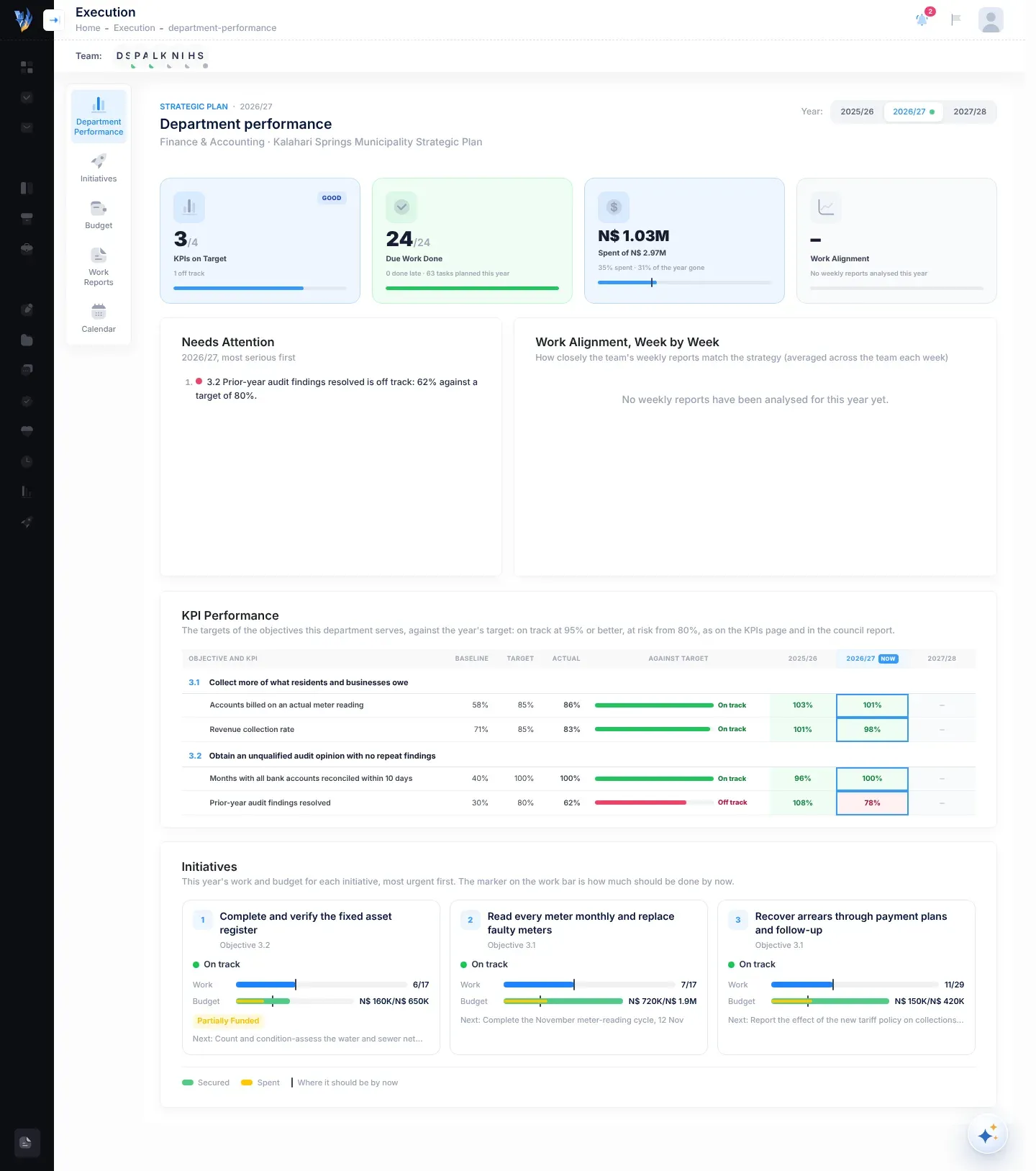
The Department performance page shows how one department is doing this year against the strategic plan: its KPIs, its work, its budget and how its weekly reports line up with the strategy. It also lists what needs attention, most serious first.
Open Department performance
Section titled “Open Department performance”Open Execution, then Department Performance. Department managers see it first when they open Execution. Others can open it if the CEO has given them access. See Manage plans and page access.
You see the departments you head, and your own department. If you see more than one department, a strip of tiles at the top lets you choose one. Each tile shows the department’s KPIs on track, its share of due work done and its spending, with a dot for its worst signal.
Choose a year
Section titled “Choose a year”The Year buttons at the top right list the plan’s years. A dot marks the current year, which is selected when the page opens.
The four tiles
Section titled “The four tiles”| Tile | What it shows |
|---|---|
| KPIs on Target | How many of the KPIs this department works towards are on track, out of those with a result this year. A badge rates it: Excellent (90% or more), Good (70% or more), Moderate (40% or more) or Low. Under it, how many are at risk, off track or without data. |
| Due Work Done | How many tasks due so far this year are done, out of all those due. Under it, how many were done late and how many are planned for the year. A badge shows how many are overdue. |
| Spent of | How much has been spent, out of the year’s allocated budget, with a mark for how much of the year has gone. A badge says Over budget, or how many initiatives are unfunded. |
| Work Alignment | How closely the team’s weekly reports matched the strategy, over the last 8 weeks that have analysed reports. A badge shows the change against the 8 weeks before them, for example ▲ 6 pts. |
The KPIs counted are those of the objectives the department’s initiatives serve.
Needs Attention
Section titled “Needs Attention”A numbered list of this year’s problems, most serious first:
- KPIs off track, and initiatives over budget;
- initiatives with missed work;
- initiatives with part of their budget not yet funded;
- initiatives that are behind or stalled, and a drop of 10 points or more in work alignment;
- KPIs at risk;
- initiatives with no work planned this year.
When nothing needs attention, it says “Nothing needs attention this year: KPIs, work and budget are all on course.”
Work Alignment, Week by Week
Section titled “Work Alignment, Week by Week”A chart with one point per week: how closely the team’s weekly reports matched the strategy, averaged across the team. It shows up to the last 16 weeks of the year. A dashed line marks 75%. Point at a week to see its score and how many reports it is based on.
For how alignment is measured, see Work alignment.
KPI Performance
Section titled “KPI Performance”A table of the KPIs this department works towards, grouped under their objectives, with each objective’s number. For each KPI:
- Baseline, Target for the year and Actual;
- Against target: a bar and the status On track, At risk, Off track or No data;
- a column for every plan year, with the result as a percentage of that year’s target. The current year is marked NOW.
Initiatives
Section titled “Initiatives”One card per initiative of the department, most urgent first. Each card shows:
- the initiative’s number, name and objective number;
- its status, with the main reason, for example Behind. See Initiative statuses;
- Work: tasks done out of this year’s tasks, with a mark for where it should be by now;
- Budget: what is secured and what is spent, against the allocation, or “No budget this year”;
- a badge for Over budget or a funding status that isn’t Fully Funded, and the next task due.
If something looks wrong
Section titled “If something looks wrong”| What you see | Why | What to do |
|---|---|---|
| “No Department to Show” | You don’t belong to a department, and you don’t head one. | Ask your CEO or your VirgilTrack administrator to put you in your department. |
| A department’s page is almost empty | None of the plan’s initiatives belong to that department yet. | Ask your CEO whether initiatives should be assigned to it. |
| “No weekly reports have been analysed for this year yet.” | The team’s reports haven’t been compared with the strategy yet. | See Work alignment. |