

Mark a risk as mitigated or archive it
When the work on a risk is done, mark it as mitigated. If you no longer need to manage a risk at all, archive it instead. Both take the risk out of the Active list.
| Question | Mark as mitigated | Archive |
|---|---|---|
| Use it when | Every control is in place and the risk is under control. | The risk no longer applies, or was recorded by mistake. |
| Needs all controls done | Yes | No |
| The risk moves to | The Mitigated group | The Archived group |
| Is anything deleted? | No | No |
Before you start
Section titled “Before you start”- You can mark a risk as mitigated only when all its controls are done. Controls that VirgilTrack’s AI suggested and nobody accepted don’t count. See Risk controls.
- In the register, the buttons are shown for risks that are New or In Progress.
Mark a risk as mitigated from its page
Section titled “Mark a risk as mitigated from its page”-
Open the risk’s page. For example, select the risk in Risk Register.
-
Select Mark as mitigated.
If it is greyed out, some controls aren’t done yet. The line under the button says how many are left.
-
In Mark as mitigated?, select Yes, it’s mitigated.
A Risk mitigated message says “Nicely done. The risk is now marked as mitigated.” Then the risk register opens.
Mark risks as mitigated from the register
Section titled “Mark risks as mitigated from the register”- Open Risk Register.
- Do one of these:
- For one risk, select the Mark as mitigated button (a tick) in its Actions column.
- For several, tick the box at the start of each row, then select Mark as mitigated in the bar above the table.
- In Mark as mitigated? (or Mark 3 risks as mitigated? for several), select Yes, mitigated.
A message says “Risk marked as mitigated.” or, for several, “3 risks marked as mitigated.”
If any of the risks still have controls to do, a Not yet message names them, for example “These risks still have controls to implement: FIN0012C”. Nothing is changed, not even the risks that were ready. Unselect the risks it names, or finish their controls, and try again.
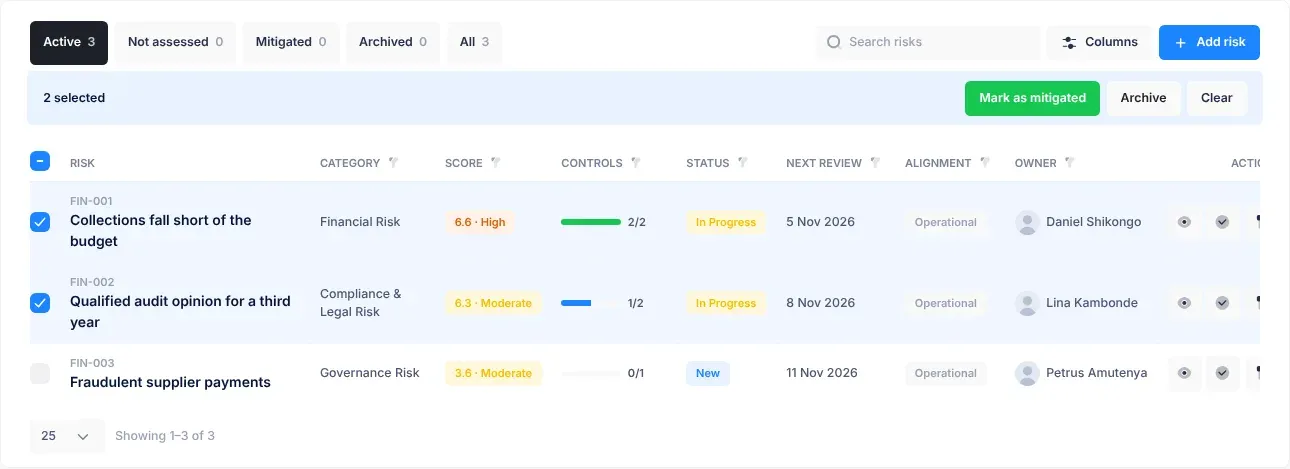
Archive risks
Section titled “Archive risks”- Open Risk Register.
- Do one of these:
- For one risk, select the Archive button (a box) in its Actions column.
- For several, tick the box at the start of each row, then select Archive in the bar above the table.
- In Archive this risk? (or Archive 3 risks?), read “Archived risks move to the Archived group. Nothing is deleted.”, then select Archive.
A message says “Risk archived.” or, for several, “3 risks archived.”
What happens next
Section titled “What happens next”A mitigated risk:
- has the status Mitigated and appears in the register’s Mitigated group and in the Mitigated column of the Kanban board;
- stops getting review reminders;
- counts as mitigated on the dashboards. See Dashboards.
VirgilTrack’s AI may also suggest a line about it for your weekly work report.
An archived risk has the status Archived and appears in the register’s Archived group. It isn’t shown on the Kanban board.
Archiving doesn’t stop review reminders. The risk’s responsible people may still be reminded of its next review.
- On the Kanban board you can also drag a card to Mitigated, but the board doesn’t check that the controls are done. Use Mark as mitigated instead, so nothing is closed too early. See The Kanban board.
- To find risks that may be ready to close, filter the register’s Controls column by All done. See The risk register.
If something goes wrong
Section titled “If something goes wrong”| What you see | Why | What to do |
|---|---|---|
| Not yet: “This risk still has controls to implement.” (on a risk’s page, with the number of controls) | At least one of its controls isn’t done. | Finish the controls, then try again. See Mark a control as implemented. |
| Mark as mitigated is greyed out on the risk’s page | Some controls aren’t done. | The line under the button says how many are left. |
| There’s no Mark as mitigated or Archive button in a row | The risk is Not assessed, or already mitigated or archived. | Assess the risk first if it is Not assessed. See Assess a risk. |
| Couldn’t save and “Something went wrong.” | Saving failed. Nothing was changed. | Try again. |