

Reset a forgotten password
If you can’t remember your password, VirgilTrack can email you a link to choose a new one. You don’t need to ask anyone for help.
If you know your password and just want to change it, do it in Settings instead. See Change your password.
Ask for a reset link
Section titled “Ask for a reset link”-
On the Sign In page, select Forgot Password ?.
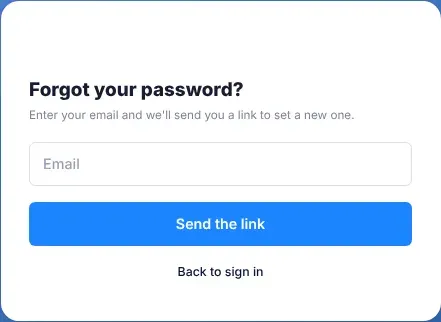
The Forgot your password? page opens.
-
Type the email address you sign in with.
-
Select Send the link.
VirgilTrack shows Check your email.
VirgilTrack gives the same answer whether or not an account uses that address. This keeps other people from finding out who has an account.
Choose a new password
Section titled “Choose a new password”-
Open the email “Set your VirgilTrack password” and select Set my password.
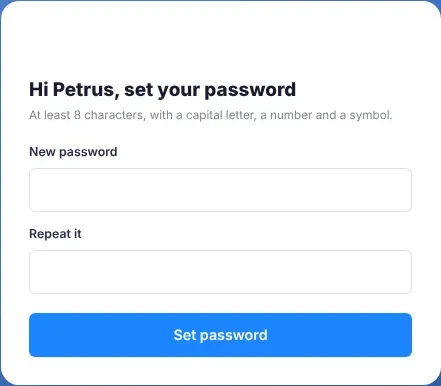
A page opens that greets you by name: “Hi …, set your password”.
-
Type your new password in New password.
Use at least 8 characters, with a capital letter, a number and a symbol. It also needs at least one small letter.
-
Type it again in Repeat it.
-
Select Set password.
-
When Password set appears, select Sign in and sign in with your email address and new password.
What happens next
Section titled “What happens next”- Your new password works straight away, and your old one stops working.
- If you hadn’t confirmed your email address yet, setting a password through the emailed link confirms it too.
- The link works only once. If you need to change your password again, ask for a new link.
If something goes wrong
Section titled “If something goes wrong”| What you see | What it means | What to do |
|---|---|---|
| No email arrives | The email may be in spam, the address may have no account, or you asked less than five minutes ago. | Check your spam or junk folder. Check that you typed the address you sign in with. VirgilTrack sends at most one link to an address every five minutes, so wait five minutes before you ask again. |
| This link has expired | The link has been used already, or it is too old. Links work once and for a limited time. | Select Send me a new link and start again. |
| “Enter your email.” | The box is empty. | Type your email address. |
| “That isn’t a valid email.” | The address isn’t complete. | Type the whole address, for example “name@council.gov.na”. |
| “Enter a password.” | New password is empty. | Type a new password. |
| “Use at least 8 characters.” | The password is too short. | Make it at least 8 characters long. |
| “The passwords don’t match.” | The two boxes are different. | Type exactly the same password in both. |
| A message that starts “Passwords must have at least one” | The password is missing a kind of character. | Add what the message asks for: a capital letter, a small letter, a number or a symbol (such as ! or #). |