

Work alignment
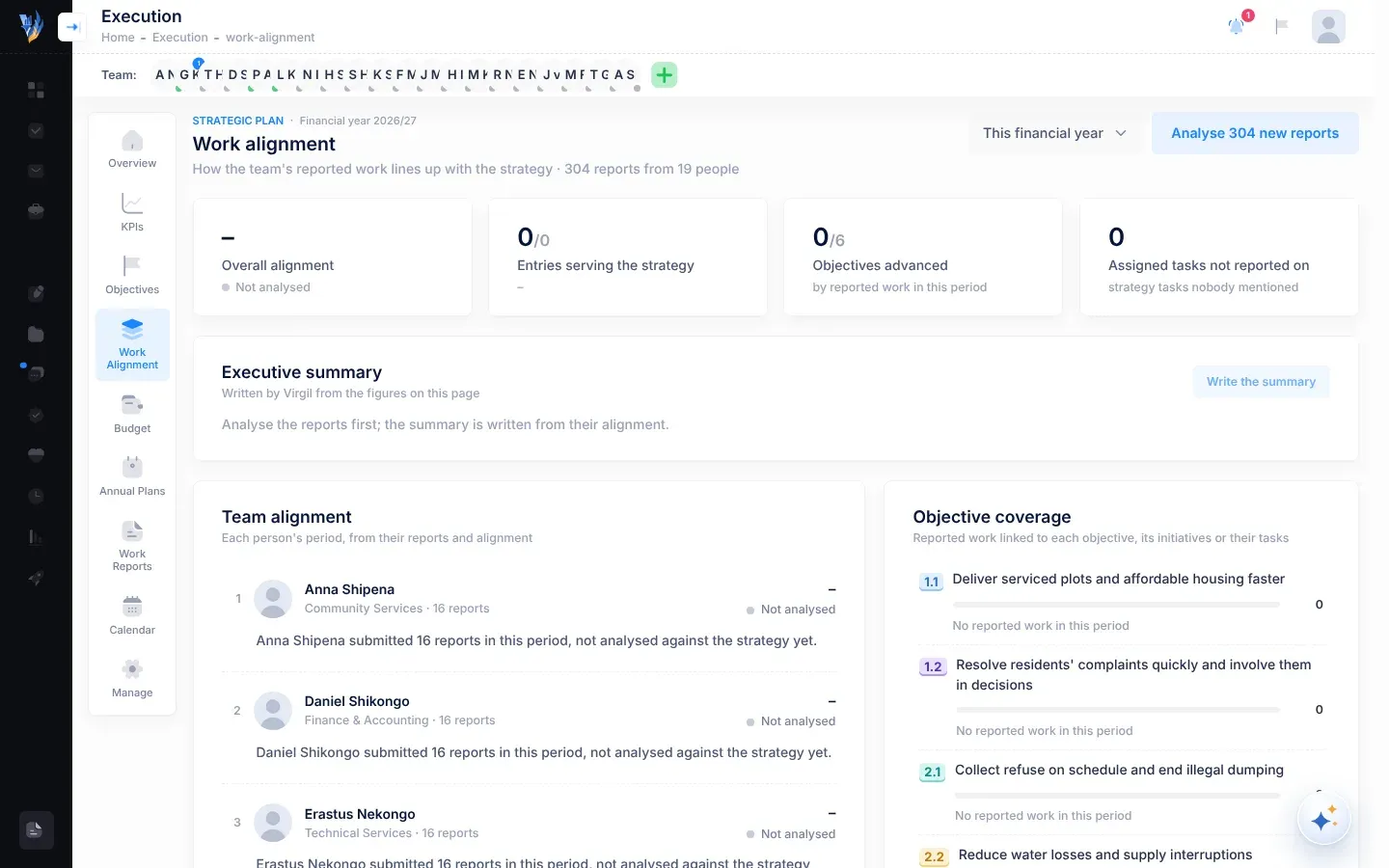
Strategy only happens if people’s daily work serves it. The Work alignment page compares the work people describe in their submitted weekly reports with your strategic plan. It shows how much of the reported work serves the plan, who is working on what, and which objectives get attention.
Open Work alignment
Section titled “Open Work alignment”Open Execution, then Work Alignment. The CEO has this page. Others can open it if the CEO has given them access. See Manage plans and page access.
How alignment works
Section titled “How alignment works”Each point in a submitted weekly report can be linked to the strategy: to an objective, to one of its initiatives, or to one of their tasks. VirgilTrack’s AI reads each report, makes these links, counts the points that serve the strategy, and gives the report an alignment score from 0% to 100%: how closely its work serves the plan.
A report is only counted once it has been analysed. If some reports in the period haven’t been analysed yet, select Analyse at the top, for example Analyse 4 new reports. A bar shows the progress: “Analysing reports against the strategy…”.
Choose the period
Section titled “Choose the period”At the top right, choose This week, Last week, This month, Last month or This financial year. The page opens on Last week, because this week’s reports are usually still being written. The title line says how many reports from how many people are included.
The four tiles
Section titled “The four tiles”| Tile | What it shows |
|---|---|
| Overall alignment | The average alignment of the analysed reports, with its level. |
| Entries serving the strategy | How many report entries serve the strategy, out of all entries, and their share of reported work. |
| Objectives advanced | How many of the plan’s objectives had reported work linked to them in this period, out of all objectives. |
| Assigned tasks not reported on | Strategy tasks given to people that nobody mentioned in their reports. |
Alignment levels
Section titled “Alignment levels”| Level | Alignment |
|---|---|
| Excellent | 85% or more |
| High | 60% or more |
| Moderate | 35% or more |
| Low | Above 0% |
| Not analysed | The reports haven’t been analysed yet, or their score is 0%. |
Executive summary
Section titled “Executive summary”Select Write the summary, and VirgilTrack’s AI assistant, Virgil, writes a short briefing from the figures on the page, in three parts:
- What’s moving: what is working.
- What’s dragging: where focus is being lost.
- What to do next: one specific action for the CEO.
Select Write it again for a new version. The summary can only be written once some reports have been analysed.
Team alignment
Section titled “Team alignment”Each person who submitted reports in the period has a short paragraph: how many reports they submitted, how much of their work served the strategy, which objectives it advanced, highlights, and where it drifted. People are listed from the most aligned down. Each shows their alignment and level.
At first, the paragraph is written from the figures. Shortly after, Virgil replaces it with a fuller account written from their reports. The card’s subtitle says which you are reading.
Objective coverage
Section titled “Objective coverage”Each objective, with its number, title, how many report entries were linked to it, its initiatives or their tasks, and who wrote them. An objective with none says “No reported work in this period”.
When an objective’s number, such as 2.1, appears in the summary or in a person’s paragraph, it is shown as a coloured chip. Point at it to see the objective’s title, or select it to bring that objective into view in Objective coverage.
If something looks wrong
Section titled “If something looks wrong”| What you see | Why | What to do |
|---|---|---|
| “No submitted reports in this period” | Nobody submitted a report in the chosen period. | Choose a longer period, or check back once reports are in. |
| “No approved strategic plan yet” | The organisation’s plan isn’t approved yet. | See Review and approve an imported plan. |
| “The summary couldn’t be written just now. Try again in a moment.” | The AI couldn’t write the summary. | Try again in a moment. |
| A person’s score shows – and Not analysed | Their reports haven’t been analysed. | Select Analyse at the top. |