

The KPIs page
A KPI (key performance indicator) is a measure that shows whether an objective is being achieved, such as “Collection rate” or “Kilometres of road resealed”. The KPIs page lists every KPI in the approved plan, compares each one’s result with this year’s target, and shows which need attention.
Open the KPIs page
Section titled “Open the KPIs page”Open Execution, then KPIs. The CEO has this page. Other people can open it if the CEO has given them access. See Manage plans and page access.
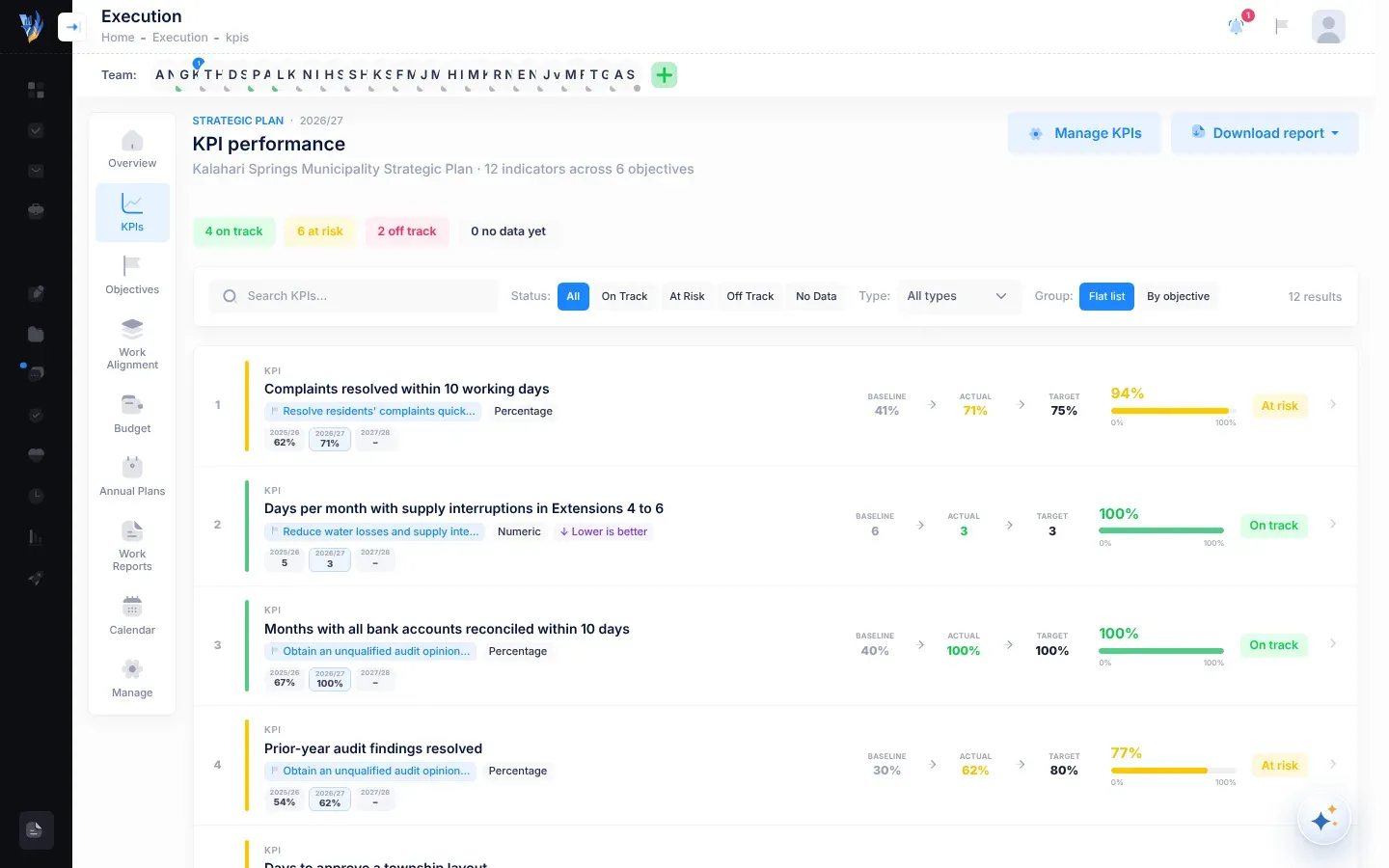
The page at a glance
Section titled “The page at a glance”- At the top: the current plan year and the title KPI performance. Under the title, your plan’s name and how many indicators it has across how many objectives. A Last reviewed badge shows the date of the most recent KPI review. It turns red when the last review was more than three months ago.
- Buttons: Review KPIs (for people who record KPI results), Manage KPIs (for the CEO) and Download report.
- Counts: how many KPIs are on track, at risk, off track and have no data yet.
- The filter bar and the list of KPIs.
Find a KPI
Section titled “Find a KPI”| Filter | What it does |
|---|---|
| Search KPIs… | Shows KPIs whose name, or whose objective’s title, contains what you type. |
| Status | All, On Track, At Risk, Off Track or No Data. |
| Type | The KPI’s unit: All types, Percentage, Currency, Numeric, Boolean or Text. |
| Group | Flat list shows one list. By objective groups the KPIs under their objectives, each with its number of KPIs. |
The number of results is shown on the right of the bar. If nothing matches, the page says “No KPIs match your filters”.
A KPI’s row
Section titled “A KPI’s row”| Part | What it shows |
|---|---|
| Number and name | The KPI’s place in the list and its name. |
| Badges | Its objective (shortened if long), its unit, and ↓ Lower is better when a lower value is the aim. |
| Year chips | When the plan has more than one year: the actual result for each year. The current year’s chip is outlined. |
| Baseline → Actual → Target | Where the KPI started, its result this year, and this year’s target. |
| Achievement | How close the result is to the target, as a percentage and a bar from 0% to 100%. A KPI with no result says No data. |
| Status | On track, At risk, Off track or No data yet. |
Select a row to open the KPI’s details.
KPI statuses
Section titled “KPI statuses”| Status | Meaning |
|---|---|
| On track | The result has reached this year’s target: 100% or more. |
| At risk | The result is between 75% and 100% of the target. |
| Off track | The result is below 75% of the target. |
| No data yet | No result has been recorded for this year. |
A KPI that has a result but no target for this year shows Off track, so check its targets with Add, change or delete KPIs.
For a KPI where lower is better, the comparison is turned around: beating the target means coming in under it. See How progress and status are worked out.
A KPI’s details
Section titled “A KPI’s details”Selecting a row opens a panel on the right.
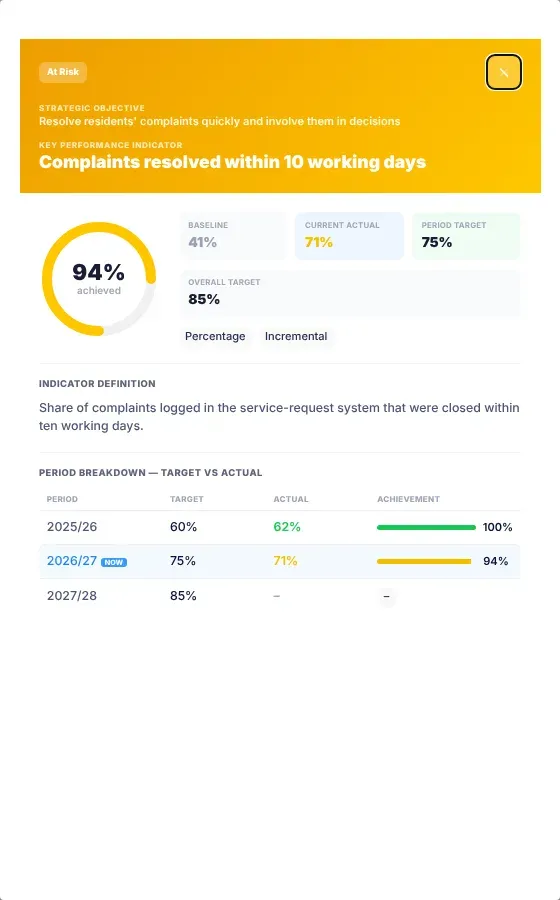
- At the top: the KPI’s status, its Strategic Objective and its name, under Key Performance Indicator.
- A ring with the percentage achieved this year.
- Baseline, Current Actual, Period Target (this year’s target) and Overall Target (the target for the whole plan), with badges for the unit and direction.
- Latest Review: the result most recently recorded for this year, if any. It shows the review’s status, the Committed actual, the Previous value, the reviewer’s comment, who reviewed it and when. revised 2× means it has been reviewed twice this year. See Record KPI results.
- Indicator Definition: what exactly is measured.
- Period Breakdown — target vs actual: each year’s Target, Actual and Achievement. The current year is marked NOW.
To close the panel, select the close button (×) at the top or anywhere outside the panel.
A review is due
Section titled “A review is due”People who record KPI results see a banner, “A KPI review is due”, when no review has been recorded yet, or the last one was more than three months ago. While a review is due, the review opens by itself when you open the page. See Record KPI results.