

Delegate or remind in one sentence
The quick bar is the fastest way to give someone work or set a reminder. Type one sentence, such as “Brandon, prepare the Outjo WIP schedule by Friday”. VirgilTrack fills in who, what and when for you to check, and you press Enter.
Open the quick bar
Section titled “Open the quick bar”Do one of these:
- Press Ctrl + J (Cmd + J on a Mac) on any page.
- Select some text on a page with the mouse, such as a line in a task or a report. A small dark bar appears under it. Select Delegate to make it a task, or Remind me to make it a reminder.
The selected text must be between 3 and 800 characters long. The small bar doesn’t appear for text you select inside a box you are typing in, or inside the Copilot panel.
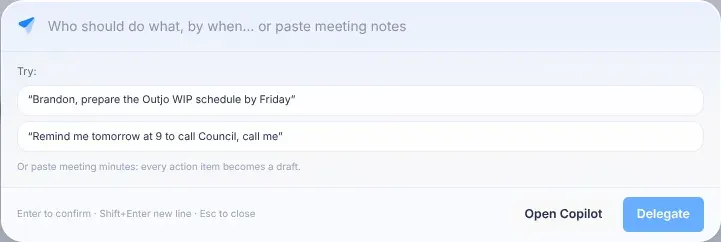
Delegate work
Section titled “Delegate work”-
Open the quick bar.
-
Type who should do what, and by when. For example: “Brandon, prepare the Outjo WIP schedule by Friday”.
Or select one of the examples under Try:. After a short pause, a card shows what VirgilTrack understood.
-
Check the card:
- Who?: the person. Each name shows their department and how many open tasks they have.
- The date: the due date.
- The priority: Low, Medium, High or Critical. Medium unless your sentence says otherwise.
- What needs doing?: the task’s title. A line of detail may appear under it.
- The initiative: the strategic initiative the work belongs to, or No initiative (calendar task).
Change anything that isn’t right.
-
Press Enter, or select Delegate.
A green box lists what was done, for example “✓ Delegated “Prepare the Outjo WIP schedule” to Brandon, due Fri 31 Oct.” The quick bar closes after a few seconds.
Strategy task or calendar task
Section titled “Strategy task or calendar task”| If the card has | VirgilTrack creates | Who can do it |
|---|---|---|
| An initiative | A strategy task under that initiative, assigned to the person. | Managers, the CEO and the initiative’s leads |
| No initiative (calendar task) | An all-day task in the calendar, on the due date, assigned to the person. With no date, it goes three days from today. | Anyone, for any colleague |
A strategy task made without a date has no due date.
The initiatives you can choose are those in your organisation’s approved strategic plan. VirgilTrack picks one if your sentence names it or the work clearly fits it. Otherwise, check the list yourself.
Help VirgilTrack gives you
Section titled “Help VirgilTrack gives you”- “Which one?”: more than one person matches the name you typed. Select the right person.
- “⏱ Similar tasks took about 6 days: Monday 3 Nov is more realistic.” or “⏱ No date given. Similar tasks took about 6 days.”: VirgilTrack found similar finished work and how long it took. It suggests a date when yours looks too soon, or when you gave none. Select Use and the date, such as Use Mon 3 Nov, to take it.
- “↔ … has 12 open tasks; … has done similar work and has 3.”: the person already has a lot of work, and someone else has done similar work and has room. Select Give to and their name to switch.
Delegate several things from meeting notes
Section titled “Delegate several things from meeting notes”-
Open the quick bar.
-
Paste your meeting notes or minutes into the box.
VirgilTrack reads them and makes a card for every action it finds, up to 25. It leaves out discussion that isn’t an action. A line says how many it found: “4 actions found · untick any you don’t want”.
-
Check each card, and untick any you don’t want to send.
-
Select Delegate 4 (the number is how many are ticked), or press Enter.
Each card is handled separately. If one can’t be delegated, the result says so and why, and the others still go ahead.
Set a reminder
Section titled “Set a reminder”-
Open the quick bar.
-
Type who to remind, when and about what. For example: “Remind me tomorrow at 9 to call Council about the invoices, call me”.
The card changes to a reminder.
-
Check the card:
- Remind: the person. Me is you.
- The date and time. If you gave a day but no time, it is 09:00.
- About what?: the reminder text.
- How to send it: Email, Text and Phone call. Email is ticked unless you asked for something else.
-
Press Enter, or select Set reminder.
You see, for example, “Reminder set for you on Friday 31 October at 09:00, with a phone call.”
If you selected text and chose Remind me, the quick bar starts the sentence for you as “Remind me tomorrow at 9:” followed by your text. Change the time if you need to.
Other buttons and keys
Section titled “Other buttons and keys”- Open Copilot closes the quick bar and sends what you typed to Virgil Copilot, so you can talk it through.
- Ask Virgil, in the small bar over selected text, asks Virgil Copilot what the text is and what you should do with it.
- Enter confirms, Shift + Enter starts a new line, and Esc closes the quick bar. Selecting outside the quick bar also closes it.
If something goes wrong
Section titled “If something goes wrong”| What you see | Why | What to do |
|---|---|---|
| “I couldn’t find an action in that. Try “Brandon, Outjo WIP schedule, Friday”.” | VirgilTrack couldn’t tell who should do what. | Name the person and the task, for example “Brandon, Outjo WIP schedule, Friday”. |
| “Couldn’t read that just now. Try again in a moment.” | VirgilTrack couldn’t read your sentence at that moment. | Wait a moment and type again, or fill in the card yourself. |
| Delegate or Set reminder can’t be selected. | Something the card needs is missing: a person and a title for a task, or a person, a time and the text for a reminder. | Fill in the missing part. |
| “Pick who and a time in the future.” | The reminder has no person, or its time has passed. | Choose a person and a later time. |
| “Skipped “…”: only managers or the initiative’s leads can delegate strategy tasks.” | You chose an initiative, but you aren’t a manager or one of its leads. | Choose No initiative (calendar task), or ask a manager. |
| “Skipped “…”: that person isn’t in your organisation.” | The person can’t be found in your organisation, or their account is locked. | Choose someone else. |
| “Skipped “…”: no calendar task type is set up.” | Your organisation’s calendar isn’t set up for tasks. | Tell your administrator. |