

IPSAS readiness risks
Hierdie inhoud is nog nie in jou taal beskikbaar nie.
IPSAS are the International Public Sector Accounting Standards. An organisation moving to accrual-basis IPSAS needs to know what could hold the move back, such as missing asset registers or too few trained staff. If your organisation’s Risk Repository has IPSAS readiness suggestions, you can copy them into your risk register, manage them like any other risk, and download them as an IPSAS Readiness Risk Report.
Which risks are IPSAS readiness risks
Section titled “Which risks are IPSAS readiness risks”A risk counts as an IPSAS readiness risk when it has the tag IpsasReadiness. You see a risk’s tags on its page, under Tags in About this risk.
A risk gets this tag in one way: when someone copies an IPSAS readiness suggestion from the Risk Repository into the register. You can’t add or remove tags on a risk yourself.
Add IPSAS readiness risks to your register
Section titled “Add IPSAS readiness risks to your register”-
Select Risk Repository in the menu.
-
Select Filter. Under Risk Type:, choose IPSAS READINESS RISK, then select Apply.
The list shows the suggestions tagged IpsasReadiness.
-
Tick the suggestions that apply to your organisation and select Copy Selected. Then select Yes, copy them!.
See The risk repository for the full steps and limits.
-
Open Risk Register and assess each copied risk.
Copied risks start as Not assessed. Give each one its likelihood, impact, deadline, review frequency and responsible people. See Assess a risk.
The copied risks belong to your department, with you as their owner. They keep the IpsasReadiness tag.
Download the IPSAS Readiness Risk Report
Section titled “Download the IPSAS Readiness Risk Report”The report lists your IPSAS readiness risks as a register, ready to print or share with council, the audit committee or auditors.
Before you start
Section titled “Before you start”- Assess the risks and give each one a review frequency. The report only includes risks that have a Review every frequency. Risks that are still Not assessed, or were assessed without one, are left out.
- Know when the risks were added. The report includes risks by the date they were recorded in VirgilTrack.
- Deferred risks are always left out. The report has no setting to include risks with the status Deferred.
Get the report
Section titled “Get the report”-
Select Report Builder in the menu.
-
Under Within Date Range, choose dates that include the day the risks were added.
-
Under Report Type, choose IPSAS Readiness Risk Report.
-
Check Risk Categories, With Risk Status and From Department(s).
Everything is selected at first; narrow the choices if you want only some risks. Managers and employees can report on their own department. The CEO can choose any department.
-
To include archived risks, switch on Include Achieved Risks.
Include Closed Risks adds mitigated risks only if Mitigated is ticked under With Risk Status. That status is only listed when it is in use, so mitigated risks are usually left out.
-
Select Download.
You see “Compiling report, please wait…”, then the report downloads as a PDF and you see “File Downloaded Successfully!”.
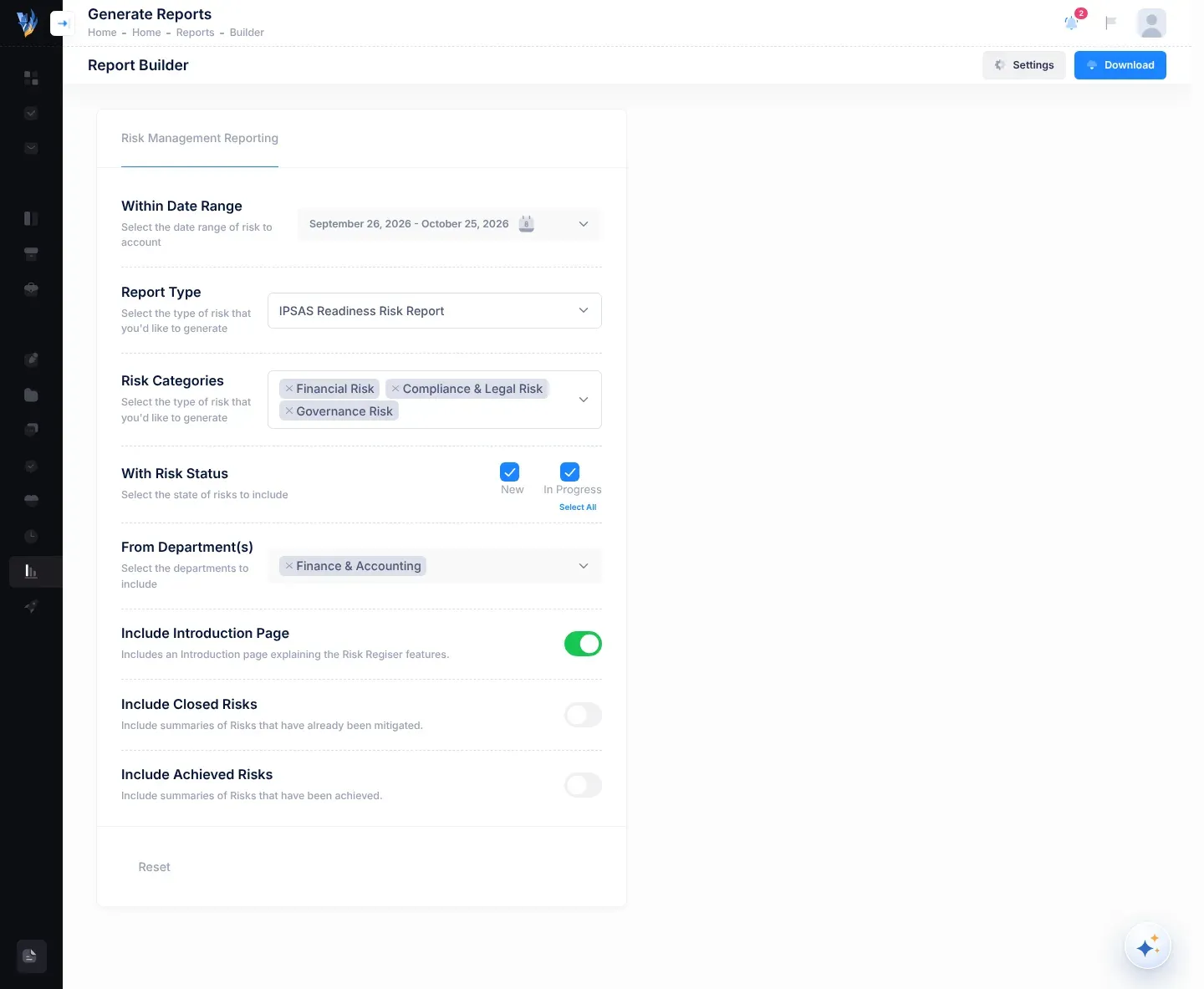
For the other Report Builder settings, see Make a risk report.
What the report shows
Section titled “What the report shows”The report is titled “Accrual basis IPSAS readiness risk register”. For managers and employees, the title is followed by the department’s name in brackets. Risks are grouped under their category, for example “Category: Governance Risk”.
| Column | What it shows |
|---|---|
| Risk Code | The risk’s code. |
| Risk Description | The risk’s description. |
| Risk Status | For example New or In Progress. |
| Impact (1-5) | The impact score and its name, for example “5 (Very High)”. |
| Likelihood (1-5) | The likelihood score and its name. |
| Risk Score (1-10) | The risk score. See How risk scores work. |
| Significance | A word for how serious the score is (see below). |
| Financial Exposure | The risk’s estimated financial exposure in N$. |
| Affected Departments | Empty at present. To see a risk’s affected departments, open the risk’s page. |
| Implications | What happens to the organisation if the risk materialises. |
| Controls | The descriptions of the risk’s controls. |
| Mitigation Deadline | The risk’s Mitigate by date. |
| Oversight Responsibility | The risk’s owner in bold, then its responsible people. |
The Significance column uses its own five words, shaded from green to red:
| Risk score | Significance |
|---|---|
| Up to 2 | NEGLIGIBLE |
| Over 2, up to 4 | MINOR |
| Over 4, up to 6 | MODERATE |
| Over 6, up to 8 | SIGNIFICANT |
| Over 8, up to 10 | SEVERE |
These words are not the same as the levels you see on screen (Low, Moderate, High and Critical). The score is the same.
If something goes wrong
Section titled “If something goes wrong”| What you see | Why | What to do |
|---|---|---|
| The report has no risks. | None of the risks matching your choices has the IpsasReadiness tag, they have no Review every, or they were added outside the date range. | Copy IPSAS readiness suggestions from the Risk Repository, assess them, and widen Within Date Range. |
| “There is currently no Suggestions in the Repository.” after you choose IPSAS READINESS RISK. | Your organisation’s repository has no IPSAS readiness suggestions, or you have already copied or hidden them. | Check the register for risks with the IpsasReadiness tag. |
| “The selected … department(s) have risks but not in the selected date range.” | None of the department’s risks were added within Within Date Range. | Widen the date range. |
| An IPSAS risk you recorded yourself isn’t in the report. | Risks added with Add risk don’t get the IpsasReadiness tag. | Use a copied IPSAS readiness risk where one fits. |
| “Please select the Type of Report you want to generate.” | No Report Type is chosen. | Choose IPSAS Readiness Risk Report. |
| “You cannot currently Generate Reports as you don’t have sufficient Risks Recorded”, with no settings and no Download button. | Your department (for the CEO, the organisation) has no risks that aren’t mitigated. | Nothing to report yet. Add or copy risks first. |