

The Budget page
Hierdie inhoud is nog nie in jou taal beskikbaar nie.
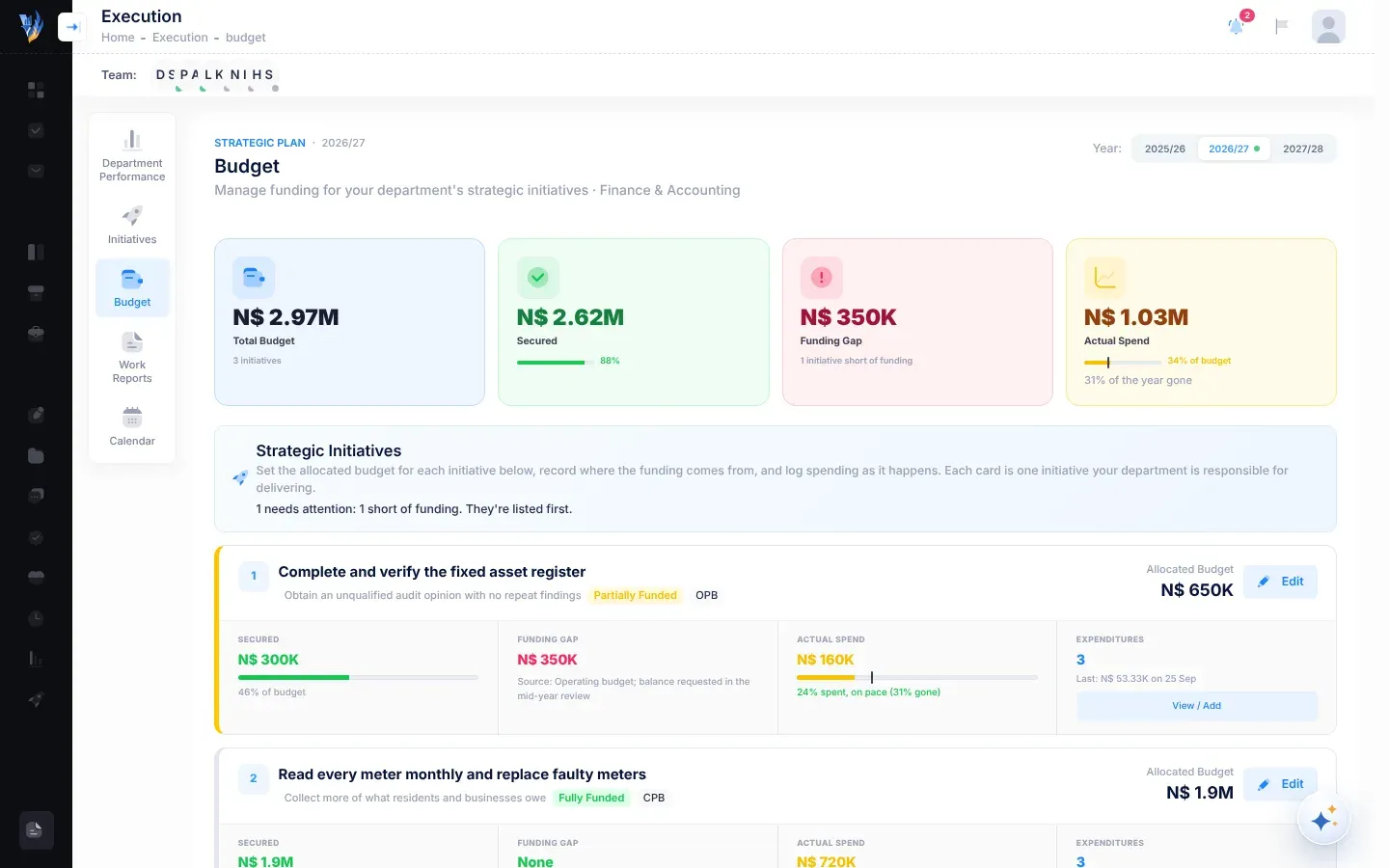
The Budget page shows the money behind each strategic initiative for a plan year: what it is allocated, how much of that is actually secured, what is still missing, and what has been spent. Initiatives with a problem are listed first.
Open the Budget page
Section titled “Open the Budget page”Open Execution, then Budget. Department managers and the CEO have this page.
- The CEO sees every department’s initiatives.
- A department manager sees the initiatives of the departments they head, and of their own department.
- Anyone else the CEO has given this page sees the initiatives of their own department.
The line under the title says which, for example All departments or the names of your departments.
Choose a year
Section titled “Choose a year”The Year buttons at the top right list the plan’s years. A dot marks the current year, which is selected when the page opens. Select another year to see its budgets.
The summary tiles
Section titled “The summary tiles”| Tile | What it shows |
|---|---|
| Total Budget | The total allocated to the initiatives you see this year, and how many initiatives there are. |
| Secured | How much of it is confirmed in hand, as a bar and a percentage. |
| Funding Gap | How much is still missing, added up initiative by initiative, or Nil. Under it: how many unfunded mandates there are, how many initiatives are short of funding, “Every allocation fully funded” or “No allocations yet”. |
| Actual Spend | How much has been spent this year, as a bar against the budget. A mark on the bar shows how much of the year has gone. Under it: the share of the budget spent, or how much it is over budget, and, for example, “45% of the year gone”. |
The initiative cards
Section titled “The initiative cards”Under Strategic Initiatives, each initiative has a card. When you see more than one department, cards are grouped under each department’s name, with its number of initiatives and its total allocation. Initiatives without a department are grouped under Not yet assigned to a department. Initiatives of the Executive Suite, the CEO’s own office, are grouped under Office of the CEO.
A line under the heading says what needs attention, for example “3 need attention: 1 over budget, 2 without an allocation. They’re listed first.” When nothing does, it says “Every initiative is allocated, funded and within its budget.” Within each department, cards are in this order:
- over budget;
- unfunded;
- without an allocation;
- short of funding, or spending more than is secured;
- spending well ahead of, or well behind, the year;
- everything else.
Cards with a problem have a coloured edge. Red is for over budget or unfunded. Amber is for no allocation, or short of funding.
What a card shows
Section titled “What a card shows”- The initiative’s name and objective.
- Badges: No allocation yet, or its funding status; its budget type (OPB, CPB or Mixed) if set; and Over budget if spending is more than the allocation.
- The last change to its budget: what changed, who changed it, when, and why.
- Allocated Budget, on the right, with Edit, or Allocate budget if there is no allocation yet. See Allocate an initiative’s budget.
- Secured: the amount, a bar, and its share of the budget.
- Funding Gap: what is still missing, or None, and the funding Source if given.
- Actual Spend: what has been spent, with a bar and a mark for how much of the year has gone. A note says whether spending is on pace, for example “40% spent, on pace (45% gone)”, ahead of the year or behind it. If spending is more than the secured amount, it says how much more.
- Expenditures: how many have been logged, the last one, and View / Add. See Record spending on an initiative.
Funding statuses
Section titled “Funding statuses”The funding status follows the amounts, so it never contradicts them.
| Status | When it applies |
|---|---|
| Fully Funded | The secured amount covers the whole allocation. |
| Partially Funded | Part of the money is secured, and the rest isn’t being sought yet. |
| Unfunded | No money is secured yet, and none is being sought. |
| Seeking External Grant | Money is still missing, and it is being sought from a grant or donor. |
| Awaiting Ministry Approval | Money is still missing, and it depends on the Ministry’s approval. |
An initiative is an unfunded mandate when money is still missing and its status is Unfunded, Seeking External Grant or Awaiting Ministry Approval.
Spending pace
Section titled “Spending pace”VirgilTrack compares the share of the budget spent with the share of the year that has gone:
- ahead of the year: more than 15 points ahead, for example 65% spent when 45% of the year has gone;
- behind the year: more than 25 points behind, for example 15% spent when 45% of the year has gone;
- on pace: anything in between.
Budget types
Section titled “Budget types”| Type | Meaning |
|---|---|
| OPB | Operating Budget: running costs, such as salaries, maintenance and services. |
| CPB | Capital Budget: assets and infrastructure, such as works, equipment and land. |
| Mixed | Both operating and capital spending. |
| Unspecified | Not yet classified. |
If something looks wrong
Section titled “If something looks wrong”| What you see | Why | What to do |
|---|---|---|
| “No Initiatives Assigned” and “No strategic initiatives are assigned to your department.” | None of the plan’s initiatives belong to your departments. | Ask your CEO whether initiatives should be assigned to your department. |
| “No Initiatives Yet” and “The strategic plan has no initiatives yet.” (the CEO) | The approved plan has no initiatives. | Check the plan on the Objectives page. |
| “No Active Strategic Plan” | The plan isn’t approved yet. | See Review and approve an imported plan. |