

Record spending on an initiative
Hierdie inhoud is nog nie in jou taal beskikbaar nie.
An expenditure is money spent on an initiative, such as a contractor payment or an equipment purchase. Logging each one keeps the initiative’s Actual Spend true, so you can see whether it is within its budget and on pace for the year.
Before you start
Section titled “Before you start”- You need the Budget page. See The Budget page.
- The initiative must have a budget for the year. The View / Add button only appears once it has one. See Allocate an initiative’s budget.
- Have the amount, the date and, if you have one, the invoice or receipt number from your accounting system.
Log an expenditure
Section titled “Log an expenditure”-
Open Execution, then Budget, and select the plan year under Year.
-
On the initiative’s card, under Expenditures, select View / Add.
The Expenditures window opens, with the initiative’s name in its title.
-
Under Log New Expenditure, fill in Amount in N$, Date and Description, for example “Phase 1 contractor payment”.
-
If you have one, fill in ERP / Invoice Reference: the invoice or receipt number.
-
Select Log Expenditure.
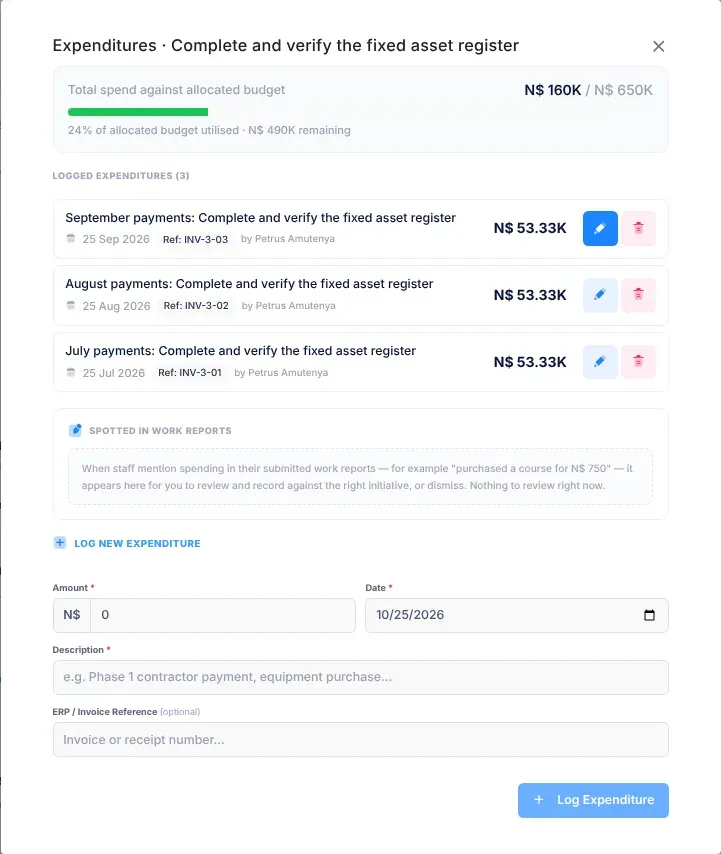
The Expenditures window
Section titled “The Expenditures window”- At the top: the total spent against the allocated budget, as a bar. Under it, the share of the budget used and what remains, for example “62% of allocated budget utilised · N$ 450K remaining”. If spending is more than the budget, it says “Spend exceeds budget by” and the amount.
- Logged Expenditures: each expenditure, newest first, with its description, date, reference, who logged it and its amount.
- Spotted in Work Reports: spending figures from staff’s submitted work reports that are waiting for review, if there are any. See Spending mentioned in work reports.
- Log New Expenditure: the form for a new one.
Correct or delete an expenditure
Section titled “Correct or delete an expenditure”- To correct one, select its pencil button, change Amount, Date, ERP / Invoice Ref or Description, and select Save.
- To delete one, select its bin button. In the message “Delete Expenditure?”, select Delete.
Spending mentioned in work reports
Section titled “Spending mentioned in work reports”Spotted in Work Reports is for amounts of money that staff in the initiative’s department mentioned in their submitted work reports, for example “purchased a course for N$ 750”. Each one shows the amount, who wrote it, the date and the sentence it came from. A badge says how many there are to review. When there are none, the section says “Nothing to review right now.”
For each one listed, decide whether it belongs to this initiative:
- Record here copies the amount, the sentence and the date into Log New Expenditure. Check them, change anything that’s wrong, then select Log Expenditure.
- Dismiss removes it from the list without recording anything.
What happens next
Section titled “What happens next”- A message confirms it: “Expenditure logged.”, “Expenditure updated.” or “Expenditure deleted.”
- The initiative’s Actual Spend, its spending pace and its number of expenditures update on the Budget page.
- Spending also shows on Department Performance and in the evidence for KPI reviews. See Department performance and Record KPI results.
If something goes wrong
Section titled “If something goes wrong”| What you see | Why | What to do |
|---|---|---|
| Log Expenditure or Save can’t be selected | Amount is zero or empty, or Description is empty. | Fill in a positive amount and a description. |
| There is no View / Add button | The initiative has no budget for this year. | Allocate its budget first. See Allocate an initiative’s budget. |