

The What’s up Today card
Hierdie inhoud is nog nie in jou taal beskikbaar nie.
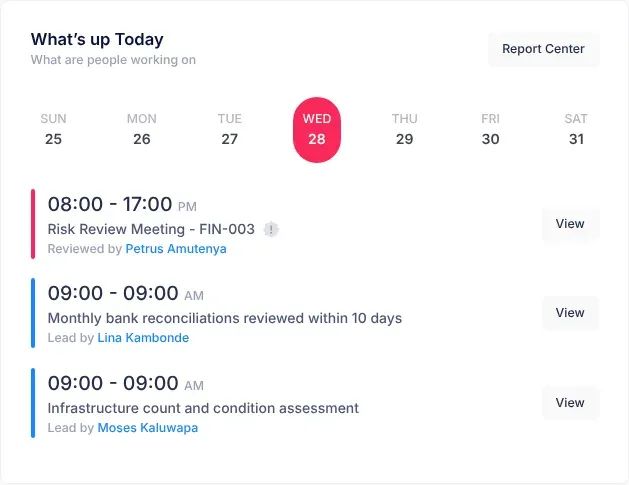
What’s up Today is a card on the Manager Dashboard and the CEO Dashboard. Under the line “What are people working on”, it lists the risk reviews and control reviews that fall on each day of the week, so you can see what is coming up.
Where to find it
Section titled “Where to find it”- On the Manager Dashboard, it is at the top right, beside your department card.
- On the CEO Dashboard, it is beside the Risk Distribution Heatmap.
See a day’s reviews
Section titled “See a day’s reviews”-
Open your dashboard with Dashboard.
In What’s up Today, today’s day is already selected.
-
Select another day in the row of days to see its list.
The days run from SUN to SAT. Under each day’s name is its date in the current week.
-
Select View next to a control review to open its risk’s page.
What each entry shows
Section titled “What each entry shows”The card has two kinds of entry. A coloured bar on the left of each entry, and its wording, tell them apart.
| Entry | Bar | What it shows |
|---|---|---|
| Risk review meeting | Red | “08:00 - 17:00”, the same for every meeting, then “Risk Review Meeting - “ and the risk’s code. Point at the small information icon to read the risk’s description. “Reviewed by” names the person the review is for. |
| Control review | Blue | The control’s next review time, in 12-hour form and always followed by “AM”, even for an afternoon time. Then the control’s description, and “Lead by” with the name of the person responsible for the control. |
A risk review is a regular check of a risk to see whether it has changed. A control review is a check that a control, an action that reduces a risk, is still working. See Risk reviews and reminders and Risk controls.
Where the entries come from
Section titled “Where the entries come from”- Risk review meetings are added when someone changes a risk’s Next review date on Edit risk. VirgilTrack adds one for each of the risk’s Responsible people. A new risk doesn’t get one until its review date is changed.
- Control reviews come from every control. Each control appears under the day of its next review, which is first set with First review when the control is added.
Who sees what
Section titled “Who sees what”What the card lists depends on your role.
| Your role | Risk review meetings | Control reviews |
|---|---|---|
| Employee | Reviews scheduled for you | Controls you are responsible for, or that you created |
| Manager | Every review in your department | Every control in your department |
| CEO | Every review in the organisation | Every control in the organisation |
Which dates appear under a day
Section titled “Which dates appear under a day”The card sorts entries by day of the week, not by date. Under MON, for example, you see every review whose date falls on a Monday, whatever the week.
If a day has nothing on it, the card says “Nothing going happening on” followed by the day’s name, for example “Nothing going happening on monday”.
Report Center
Section titled “Report Center”Select Report Center at the top of the card to open the Generate Reports page. See Make a risk report.
If something goes wrong
Section titled “If something goes wrong”| What you see | Why | What to do |
|---|---|---|
| View next to a risk review meeting doesn’t open the risk | This link doesn’t lead to the risk’s page. | Open the risk from the Risk Register instead. The entry shows the risk’s code to help you find it. See The risk register. |
| An entry seems to be for a different week | The card groups entries by day of the week only. | Open the risk’s page to see the real date. |
| Every day is empty | There are no review meetings or controls for you (or your department, or your organisation) yet. | Controls appear as soon as they are added. Review meetings appear once someone changes a risk’s Next review date. See Where the entries come from. |