

Practise with drills and conversations
Hierdie inhoud is nog nie in jou taal beskikbaar nie.
The Practise tab lets you try out emotional intelligence where mistakes don’t matter. Drills train you to recognise emotions. Practice conversations let you rehearse a hard conversation with a made-up colleague, played by Virgil, before you have a real one.
All the people and situations are made up. Your practice is private to you.
Recognise the emotion: drills
Section titled “Recognise the emotion: drills”Each set of drills has up to five short workplace situations, written fresh for you each time. For each one, you name what the person is feeling and choose the best thing to say. A set takes about 4 minutes.
-
Open Emotional Intelligence, then Practise.
-
In the Recognise the emotion box, select Start drills.
VirgilTrack writes five new situations. You see “Writing five new situations…” for a moment.
-
Read the situation. Under What are they most likely feeling?, select one of the four feelings.
The right answer is marked, with a sentence on why.
-
Under What’s the best thing to say?, select one of the three replies.
Again, the best reply is marked, with why.
-
Select Next situation. After the fifth, select See my score.
You get one point for each right feeling and one for each best reply, so a set of five scores up to 10. Select Five more for a new set, or Done to go back. Drill scores are not saved.
Practice conversations
Section titled “Practice conversations”In a practice conversation, you play the manager. Virgil plays a colleague who has feelings you can’t see. How much they trust you, and how much they tell you, depends on how you respond. When you finish, you get a debrief that quotes your own words.
Start a conversation
Section titled “Start a conversation”-
Open Emotional Intelligence, then Practise.
-
Under Practice conversations, select a scenario.
Each card shows its level (Starter, Intermediate or Advanced), the situation, the person’s name and the skills it trains. A Best label shows your best score if you’ve done it before.
-
Read What you know and Your goal, beside the conversation.
-
Read what the person says to open the conversation, then type your reply in the box, as you would say it in person.
-
Press Enter or select Send. Their answer appears as they “speak”. Words in italics describe their tone or body language, such as looks away.
-
Keep going. When you’re ready, select End and get feedback.
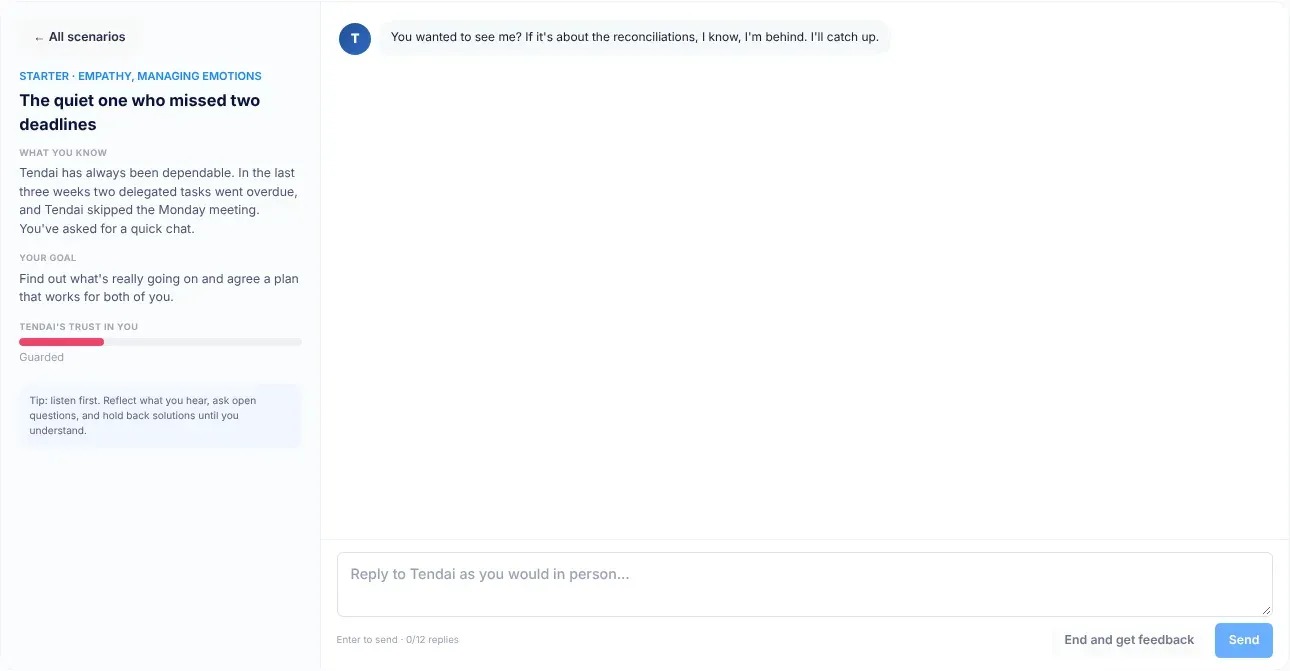
You can send up to 12 replies. The counter under the box shows how many you’ve used, for example “3/12 replies”.
The trust bar
Section titled “The trust bar”A bar headed with the person’s name, such as Tendai’s trust in you, shows how much they trust you, out of 100. It starts at 30.
| Trust | Label | How the person behaves |
|---|---|---|
| Below 40 | Guarded | Deflects and gives short answers. |
| 40 to 69 | Cautious | Shares part of the story. |
| 70 and above | Opening up | Tells you what’s really going on. |
Trust rises when you listen, reflect what they feel, ask open questions and avoid blame. It falls when you lecture, dismiss their feelings, rush to solutions or talk about yourself. The tip under the bar puts it simply: “listen first”.
Your debrief
Section titled “Your debrief”When you select End and get feedback, Virgil writes your debrief. It shows:
- Your score, out of 100, and how much trust you ended with.
- What … was really going through: what the person felt and needed, which you couldn’t see during the conversation.
- By area: a score out of 5 for each of the five skills, with evidence from what you said.
- What went well: up to three things you did well.
- Try this instead: up to three things you said, each with a better way to say it.
- Practise this week, with your real team: one small thing to try for real.
Select Try again to repeat the same conversation, or Another scenario to choose another. Each finished conversation is saved. Your latest eight are listed under Your practice on the Me tab, with their date, score and final trust.
To leave without a debrief, select ← All scenarios. Nothing is saved.
The scenarios
Section titled “The scenarios”| Scenario | Level | Person | Skills |
|---|---|---|---|
| The quiet one who missed two deadlines | Starter | Tendai | Empathy, Managing emotions |
| Upset after a public critique | Starter | Caroline | Empathy, Managing emotions |
| “Is this system watching us?” | Starter | Mr Haingura | Empathy, Motivation |
| Passed over for the lead role | Intermediate | Brandon | Empathy, Relationships |
| The high performer running on empty | Intermediate | Naledi | Empathy, Motivation |
| “She takes credit for my work” | Intermediate | Simon | Relationships, Managing emotions |
| Feedback they won’t want to hear | Advanced | Lovemore | Relationships, Self-awareness |
| Back after a loss | Advanced | Martha | Empathy, Managing emotions |
If you came from a skill on the Learn tab, only the scenarios for that skill are shown, under For and the skill’s name. Select Show all to see every scenario.
If something goes wrong
Section titled “If something goes wrong”| What you see | What to do |
|---|---|
| “Couldn’t load drills just now. Try again” | Select Try again. |
| “The practice partner didn’t respond. Try sending again.” | Your reply is back in the box. Send it again. |
| “The coach couldn’t write the debrief just now. Try again.” | Select End and get feedback again. |
| End and get feedback can’t be selected. | Send at least one reply first. |
| Send can’t be selected. | Type a reply first. After 12 replies, select End and get feedback. |